Kronos: A Foundation Model for the Language of Financial Markets

> Kronos is the **first open-source foundation model** for financial candlesticks (K-lines),
> trained on data from over **45 global exchanges**.
## 📜 Introduction
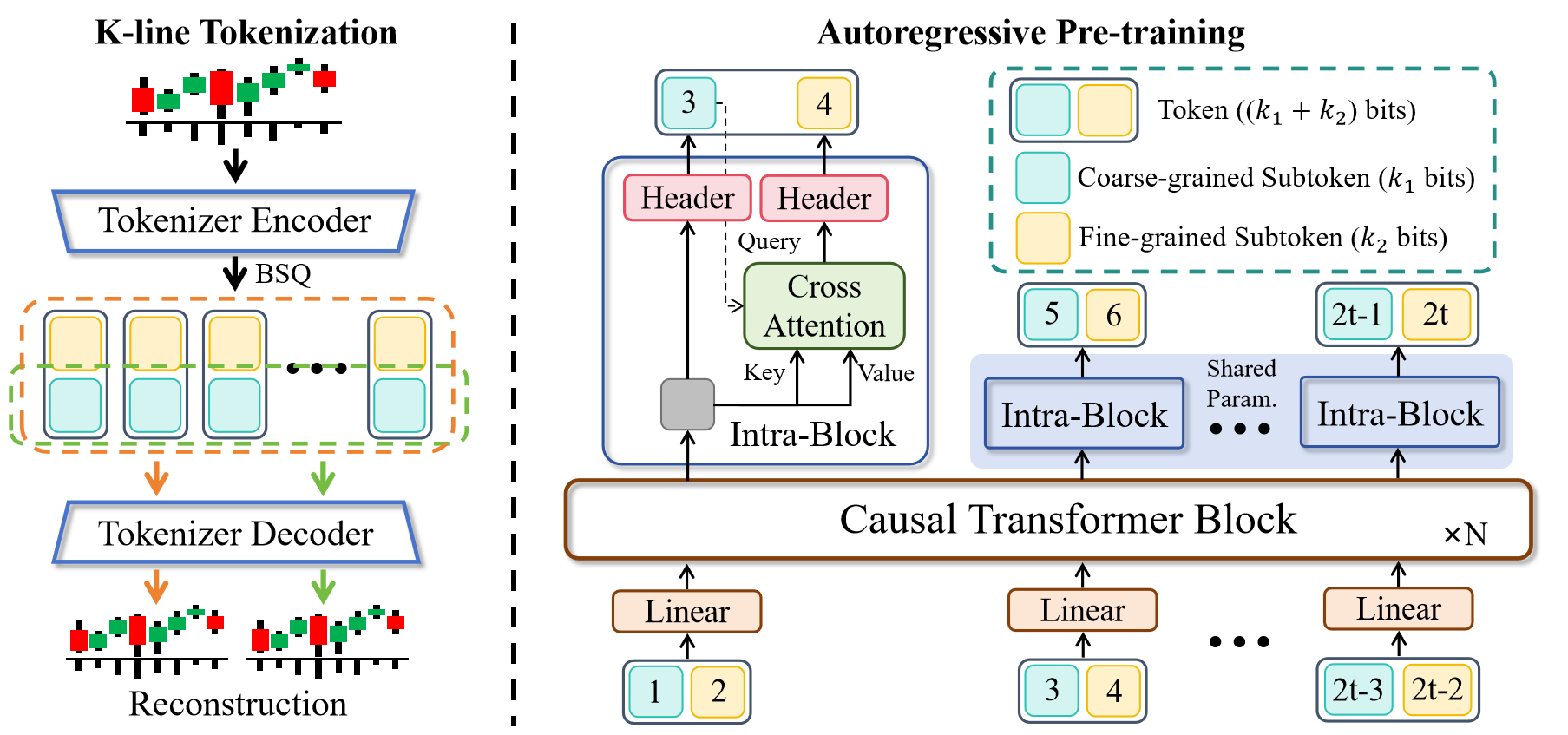
**Kronos** is a family of decoder-only foundation models, pre-trained specifically for the "language" of financial markets—K-line sequences. Unlike general-purpose TSFMs, Kronos is designed to handle the unique, high-noise characteristics of financial data. It leverages a novel two-stage framework:
1. A specialized tokenizer first quantizes continuous, multi-dimensional K-line data (OHLCV) into **hierarchical discrete tokens**.
2. A large, autoregressive Transformer is then pre-trained on these tokens, enabling it to serve as a unified model for diverse quantitative tasks.
## ✨ Live Demo
We have set up a live demo to visualize Kronos's forecasting results. The webpage showcases a forecast for the **BTC/USDT** trading pair over the next 24 hours.
**👉 [Access the Live Demo Here](https://shiyu-coder.github.io/Kronos-demo/)**
## 📦 Model Zoo
We release a family of pre-trained models with varying capacities to suit different computational and application needs. All models are readily accessible from the Hugging Face Hub.
| Model | Tokenizer | Context length | Param | Open-source |
|--------------|---------------------------------------------------------------------------------| -------------- | ------ |---------------------------------------------------------------------------|
| Kronos-mini | [Kronos-Tokenizer-2k](https://huggingface.co/NeoQuasar/Kronos-Tokenizer-2k) | 2048 | 4.1M | ✅ [NeoQuasar/Kronos-mini](https://huggingface.co/NeoQuasar/Kronos-mini) |
| Kronos-small | [Kronos-Tokenizer-base](https://huggingface.co/NeoQuasar/Kronos-Tokenizer-base) | 512 | 24.7M | ✅ [NeoQuasar/Kronos-small](https://huggingface.co/NeoQuasar/Kronos-small) |
| Kronos-base | [Kronos-Tokenizer-base](https://huggingface.co/NeoQuasar/Kronos-Tokenizer-base) | 512 | 102.3M | ✅ [NeoQuasar/Kronos-base](https://huggingface.co/NeoQuasar/Kronos-base) |
| Kronos-large | [Kronos-Tokenizer-base](https://huggingface.co/NeoQuasar/Kronos-Tokenizer-base) | 512 | 499.2M | ❌ |
## 🚀 Getting Started
### Installation
1. Install Python 3.10+, and then install the dependencies:
```shell
pip install -r requirements.txt
```
### 📈 Making Forecasts
Forecasting with Kronos is straightforward using the `KronosPredictor` class. It handles data preprocessing, normalization, prediction, and inverse normalization, allowing you to get from raw data to forecasts in just a few lines of code.
**Important Note**: The `max_context` for `Kronos-small` and `Kronos-base` is **512**. This is the maximum sequence length the model can process. For optimal performance, it is recommended that your input data length (i.e., `lookback`) does not exceed this limit. The `KronosPredictor` will automatically handle truncation for longer contexts.
Here is a step-by-step guide to making your first forecast.
#### 1. Load the Tokenizer and Model
First, load a pre-trained Kronos model and its corresponding tokenizer from the Hugging Face Hub.
```python
from model import Kronos, KronosTokenizer, KronosPredictor
# Load from Hugging Face Hub
tokenizer = KronosTokenizer.from_pretrained("NeoQuasar/Kronos-Tokenizer-base")
model = Kronos.from_pretrained("NeoQuasar/Kronos-small")
```
#### 2. Instantiate the Predictor
Create an instance of `KronosPredictor`, passing the model, tokenizer, and desired device.
```python
# Initialize the predictor
predictor = KronosPredictor(model, tokenizer, device="cuda:0", max_context=512)
```
#### 3. Prepare Input Data
The `predict` method requires three main inputs:
- `df`: A pandas DataFrame containing the historical K-line data. It must include columns `['open', 'high', 'low', 'close']`. `volume` and `amount` are optional.
- `x_timestamp`: A pandas Series of timestamps corresponding to the historical data in `df`.
- `y_timestamp`: A pandas Series of timestamps for the future periods you want to predict.
```python
import pandas as pd
# Load your data
df = pd.read_csv("./data/XSHG_5min_600977.csv")
df['timestamps'] = pd.to_datetime(df['timestamps'])
# Define context window and prediction length
lookback = 400
pred_len = 120
# Prepare inputs for the predictor
x_df = df.loc[:lookback-1, ['open', 'high', 'low', 'close', 'volume', 'amount']]
x_timestamp = df.loc[:lookback-1, 'timestamps']
y_timestamp = df.loc[lookback:lookback+pred_len-1, 'timestamps']
```
#### 4. Generate Forecasts
Call the `predict` method to generate forecasts. You can control the sampling process with parameters like `T`, `top_p`, and `sample_count` for probabilistic forecasting.
```python
# Generate predictions
pred_df = predictor.predict(
df=x_df,
x_timestamp=x_timestamp,
y_timestamp=y_timestamp,
pred_len=pred_len,
T=1.0, # Temperature for sampling
top_p=0.9, # Nucleus sampling probability
sample_count=1 # Number of forecast paths to generate and average
)
print("Forecasted Data Head:")
print(pred_df.head())
```
The `predict` method returns a pandas DataFrame containing the forecasted values for `open`, `high`, `low`, `close`, `volume`, and `amount`, indexed by the `y_timestamp` you provided.
#### 5. Example and Visualization
For a complete, runnable script that includes data loading, prediction, and plotting, please see [`examples/prediction_example.py`](examples/prediction_example.py).
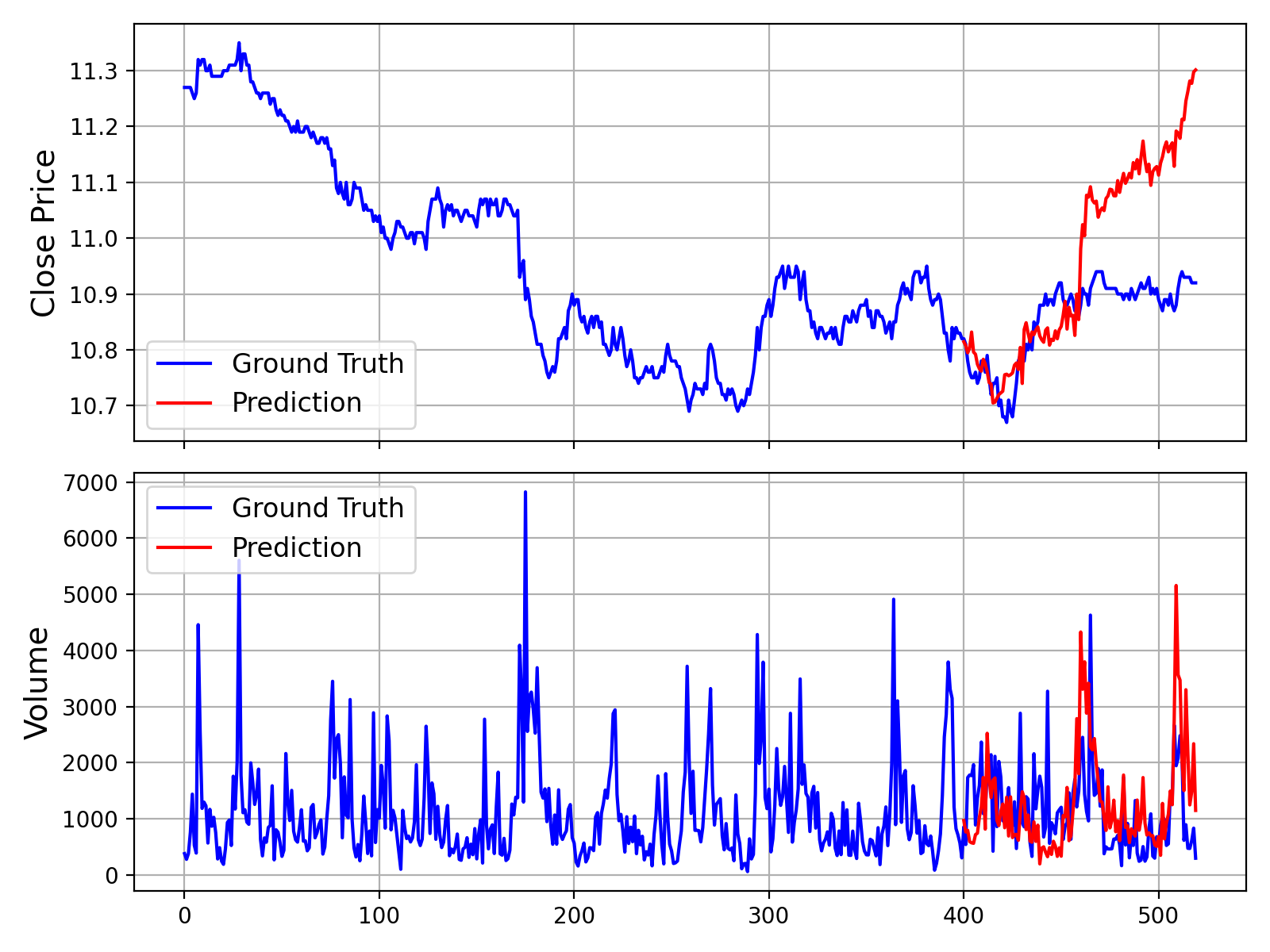
Running this script will generate a plot comparing the ground truth data against the model's forecast, similar to the one shown below:
Additionally, we also provide a script that makes predictions without Volume and Amount data, which can be found in [`examples/prediction_wo_vol_example.py`](examples/prediction_wo_vol_example.py).
## 📖 Citation
If you use Kronos in your research, we would appreciate a citation to our work. The research paper is currently in preparation.
**Paper coming soon!**
## 📜 License
This project is licensed under the [MIT License](./LICENSE).





